Your private AI workspace
that stays out of your shared screen.
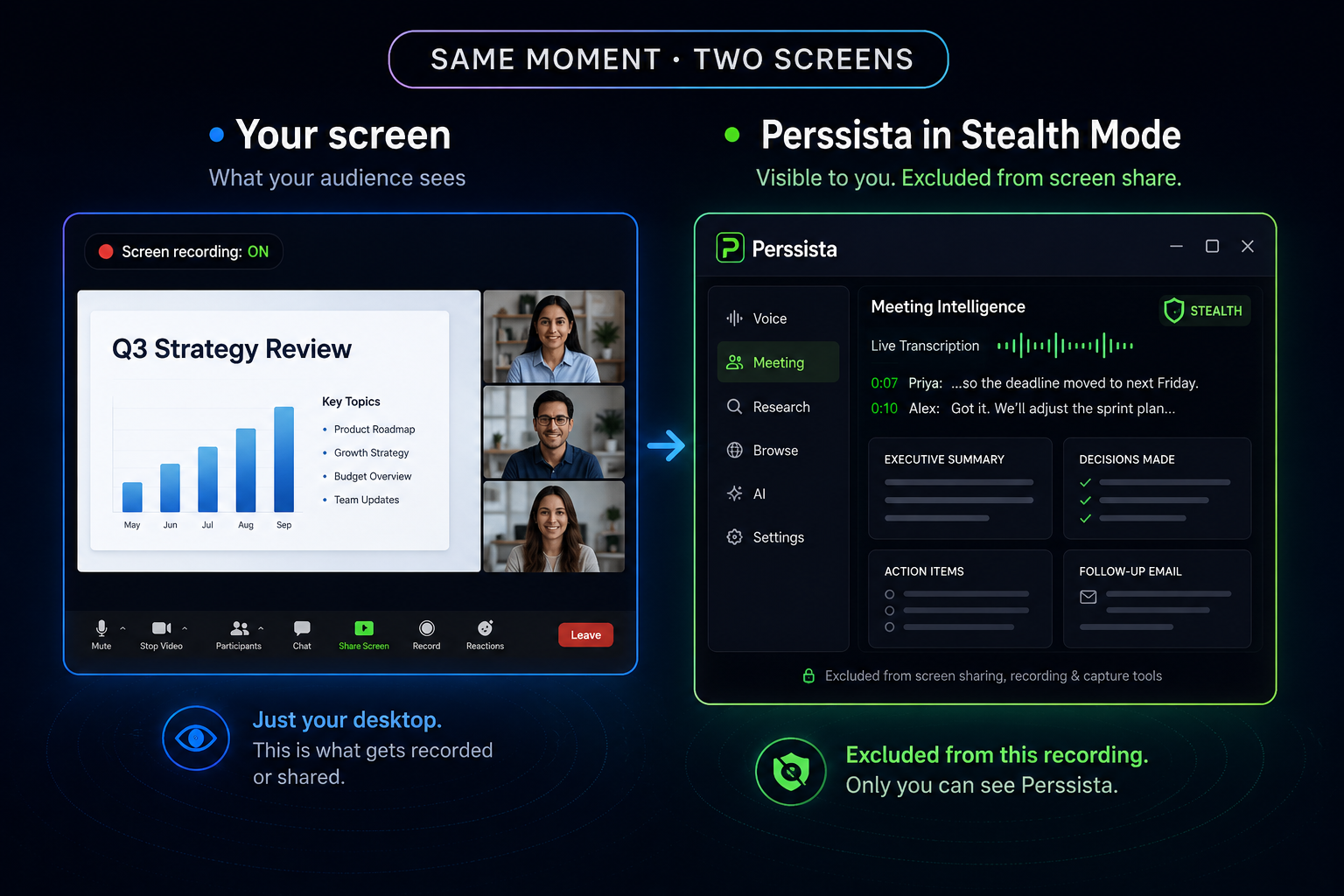
Perssista sits on your desktop alongside your meetings, research, and browsing — visible to you, and excluded from screen sharing, recording, and capture tools when you turn on Stealth Mode. Live voice transcription, Meeting Intelligence, web research, and a private browser, powered by any AI you choose.
FREE TO START · NO CREDIT CARD · UNLIMITED LOCAL TRANSCRIPTION
Works with the AI you already trust — or none at all
One assistant. Six powerful modes. Private the whole time.
Every mode below runs privately — none of it shows up on screen, in the dock, or in your recordings.
Private by an OS capability, not a workaround.
Perssista uses built-in Windows and macOS APIs that let supported applications exclude their windows from screen capture — not a trick, a real OS capability the same way password managers hide sensitive fields. Compatibility varies by operating system and by which recording software is capturing your screen.
Speak naturally. Watch your words appear in real time.
Voice input streams in ~3-second rolling chunks so you see words appear as you speak, not after you stop. Runs entirely on-device by default — 38 languages, no API key, works with no internet at all.
The transcript was never the point. This is.
Live transcription runs the whole call, then one click turns it into an executive summary, key discussion points, decisions made, action items with an owner attached, follow-up tasks, open questions, and a drafted follow-up email — saved to your account, not just shown once and lost when you close the window.
Not a search box. An actual researcher.
Give it a topic — it searches the web, reads the top sources, and comes back with a single organized answer with citations, instead of ten tabs for you to read yourself.
A private browser built for stealth.
Full tabbed browsing built in — bookmarks, ad blocking on by default, same screen-capture protection as the rest of the app. Links from any AI response open here automatically.
Your model. Your rules.
Nine cloud providers, or skip the cloud entirely — download a local model once and run fully offline from then on.
- No telemetry or usage tracking by default
- Local models process everything on-device — never sent online
- Cloud requests go straight to the provider you configure, using your own key — never through our servers
Not another chat tab.
ChatGPT and Claude are excellent for open-ended work in a browser. Perssista is built for a different moment — when you need an answer during something else, without switching windows or being seen doing it.
Comparison reflects typical browser-based AI chat apps as of this writing — check each provider's current feature set, since this changes.
Three steps. About two minutes.
Download & open
Perssista checks your hardware automatically and recommends a local AI model sized for your machine — no configuration needed.
Pick your AI
Use the recommended local model completely free and offline, or connect your own OpenAI, Claude, Gemini, or any of nine other providers.
Work invisibly
Summon it from anywhere with a global shortcut. Toggle Stealth. It disappears from every screen but yours.
Anyone who thinks faster with a second opinion nearby.
Sales & support
Pull up pricing, policy, or objection handling mid-call without ever going quiet.
Consultants & freelancers
Answer client questions on the first call with confidence, not "let me get back to you."
Students & researchers
Turn a scattered reading list into one organized, cited answer in minutes.
Developers & writers
A fast, always-available assistant that doesn't need a browser tab open to reach.
The transcript was never the point. This is.
Recording a meeting is easy. Doing something useful with it afterward is where most tools stop. Perssista turns the raw transcript into the six things you'd actually go looking for — then saves them to your account.
- ✓Executive summary — the two-minute version, not the sixty-minute one.
- ✓Key discussion points — what was actually covered, as a scannable list.
- ✓Decisions made — separated from what was merely discussed.
- ✓Action items & follow-up tasks — with an owner attached, when the conversation named one.
- ✓Questions raised — the open threads worth circling back on.
- ✓A drafted follow-up email — ready to review and send, not written from scratch.
The team aligned on shipping the Q3 beta in August. Budget concerns were raised and resolved; one open question remains on long-term migration ownership.
- Ship the beta in August
- Hire one additional engineer
- Send budget doc — Priya
- Schedule next sync — Bob
Credits for both of you
Share your code — every account gets one automatically. Once they've verified their account and taken a first real action, you both get credits. Signing up alone doesn't trigger it, so it can't be gamed by empty accounts.
Available in your language
The app interface is available in English and Hindi today, with more languages planned — built on infrastructure designed to add them without a rewrite.
Protected by your operating system, not just by us
Your session data is encrypted on-device with AES-256, and the encryption key itself is protected by your OS's own secure storage — the same mechanism your browser and password manager already rely on. If your device doesn't support it, Perssista still works, with a clearly weaker fallback rather than a silent one.
Free covers real use. Pro removes the ceiling.
Billed in ₹ INR or $ USD — detected automatically from your browser, with a manual switch if it guesses wrong.
Free
₹0
Unlimited local voice transcription. One AI conversation to try it — upgrade for unlimited.
- Unlimited local voice transcription
- 1 downloadable local AI model
- 1 AI conversation (local or cloud)
- Basic settings
Pro Monthly
₹299/mo
- Unlimited conversations
- Stealth Mode
- All 9 cloud AI providers
- Meeting Intelligence & Web Research
- Stealth Browser
- Unlimited local models
Pro Yearly Save 16%
₹2,999/yr
- Everything in Pro Monthly
- 2 months free
- Early access to new features
Before you ask.
Stealth Mode uses your operating system's native content-protection API — the same mechanism apps like password managers use to hide sensitive windows from screenshots. It's well-supported on Windows 10 (2004+) and 11. On macOS it works with most capture tools, though coverage isn't as complete. It's not reliably supported on Linux.
With a local model, nothing you type ever leaves your device — there's no server to breach because there's no server involved. If you connect a cloud provider, your messages go directly to that provider using your own API key, never through us.
Yes. Local AI chat, voice transcription, and OCR all run fully offline once set up. Cloud providers, web research, and the browser need a connection — everything else keeps working without one.
You can keep using local AI chat — the free plan doesn't expire. To start new conversations beyond the first, or unlock Stealth Mode, cloud providers, Meeting Intelligence, and Web Research, you'll need Pro.
Yes — Perssista AI is a bundled cloud option included with Pro, no API key required. Pick from five curated models (GPT-4o Mini, GPT-4o, Claude 3.5 Haiku, Claude 3.5 Sonnet, Gemini 1.5 Flash) and Perssista handles the provider connection for you. Bringing your own key to any of the 9 other providers is also always an option if you'd rather use your own account directly.
Windows, macOS, and Linux. Stealth Mode is fully supported on Windows, mostly supported on macOS, and not reliable on Linux — everything else works identically everywhere.
An executive summary, key discussion points, decisions made, action items with an owner when the conversation named one, follow-up tasks, questions raised, and a drafted follow-up email ready to review and send. It's saved to your account, not just shown once and lost when you close the window.
Every account gets a referral code automatically — find yours in Settings. When someone signs up with it, both of you get credits, but only once the new account has verified its email and taken a first real action, like starting a conversation or recording a meeting. Signing up alone doesn't trigger it.